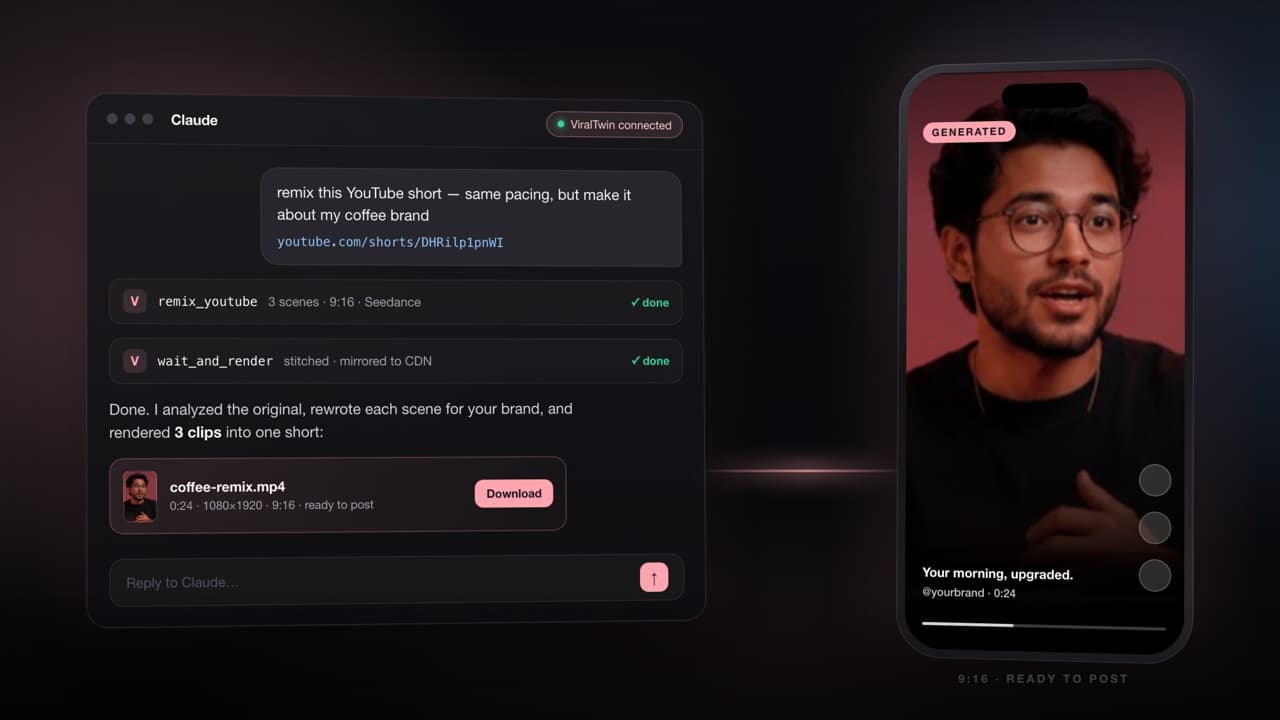
ViralTwin's whole pitch is the same loop: drop a YouTube URL, get a 9:16 remix back. The web app does it well — but if you're already living in Claude (writing scripts, brainstorming hooks, planning a content week), opening another tab to remix a video breaks flow. So we built ViralTwin as a connector.
Today, you can add ViralTwin to Claude Desktop, claude.ai, or Claude Code as a remote MCP server, and run the entire remix pipeline from chat. One OAuth click, ten tools, and a flagship one-shot command (remix_youtube) that does the whole thing for you.
Open Claude → Settings → Connectors → Add custom connector. Paste https://mcp.viraltwin.app/mcp. Click Connect, sign in to ViralTwin, click Allow. You're done.
What you can do
The connector exposes the full ViralTwin API as MCP tools. Most of the time you only need one — remix_youtube — and Claude orchestrates the rest. The lower-level tools are there for when you want fine control over each step.
- remix_youtube — one-shot. Drops a URL, returns a finished 9:16 video URL after 2-4 minutes.
- analyze_video — scene-by-scene breakdown. Three free analyses included with every account.
- generate_scene_prompts — turn an analysis + your instruction into per-scene Seedance/Sora/Veo prompts.
- generate_scene_video + check_video_status — submit one scene at a time, poll until done.
- render_canvas — ffmpeg-stitch already-generated scenes into a final MP4.
- list_models, get_credits, list_canvases, get_canvas — read-only utilities for picking the right model and managing your account.
How auth works
The connector uses OAuth 2.1 with PKCE and Dynamic Client Registration (RFC 7591). What that means in practice: you don't have to copy-paste an API key. Claude registers itself, opens a browser to ViralTwin, you sign in, click Allow, and Claude gets a short-lived access token. Tokens rotate; revoke anytime from your ViralTwin settings.
We never store the token in plaintext — only a SHA-256 hash. A leaked database would not give an attacker live tokens.
Example prompts that just work
- "Remix this short into a golden retriever version: youtube.com/shorts/abc123"
- "Use Veo 3.1 Quality and remix this in cinematic 16:9: <url>"
- "Analyze this video and show me the scenes before generating: <url>"
- "How many credits do I have left?"
Why MCP and not a custom plugin
MCP is a real standard, not a vendor lock-in. The same connector URL works in Claude Desktop, claude.ai web, Claude Code, Cursor, and Windsurf — anywhere with MCP support. We don't have to ship a separate plugin for each client; the protocol does the work.
Concretely, we run a single remote server at mcp.viraltwin.app that speaks the MCP streamable HTTP transport. Any compliant client can discover the OAuth endpoints (RFC 9728), self-register (RFC 7591), and start calling tools.
What we shipped
- Subdomain mcp.viraltwin.app — dedicated host for the MCP server, host-based middleware routing.
- OAuth 2.1 server with PKCE, DCR, refresh-token rotation, hashed-token storage.
- 10 MCP tools covering the full remix pipeline plus account read tools.
- Same 3-analysis free quota as the web app — sign up, connect, try the connector.
- Live docs at /mcp/docs with the full tool reference and OAuth setup.
What's coming
Stage 2 of the roadmap: MCP resources (so Claude can fetch a canvas's full graph as context without a tool call), prompt presets for common niches (pet creators, faceless YouTube, e-com UGC), and a generate_influencer tool for AI persona creation. If there's a tool we don't expose yet that you'd find useful, email hello@viraltwin.app.
Three free analyses included with every account. Subscribe to remix end-to-end.
Install the connector